Platform
Everything between the menu you design and the menu on the table.
The days your team spends rebuilding the same menu across locations and formats are the days Menuology™ gives back. It holds your items, your prices, your locations, and your menu designs in one system, produces the file that goes to press, and keeps a record of exactly what went where.
Every item, kept once
Items, descriptions, prices and modifiers, in one library.
Every item, description, price and modifier lives in one library, kept by the people who own it, and every menu in the group is drawn from there: the dining room menu, the wine book, the brunch card, the private-dining piece. Change a description once and it is right on every menu that carries it, in every language you publish.
Nothing is retyped from a spreadsheet. Nothing quietly drifts between locations. Nobody has to reconcile the designer's file against the price list against an email thread to find out what the menu actually says. When something does change, the record says what, where, when and by whom.
Press-quality output, and the file is yours
The scheduled run, and the reprint you need in the next ten minutes.
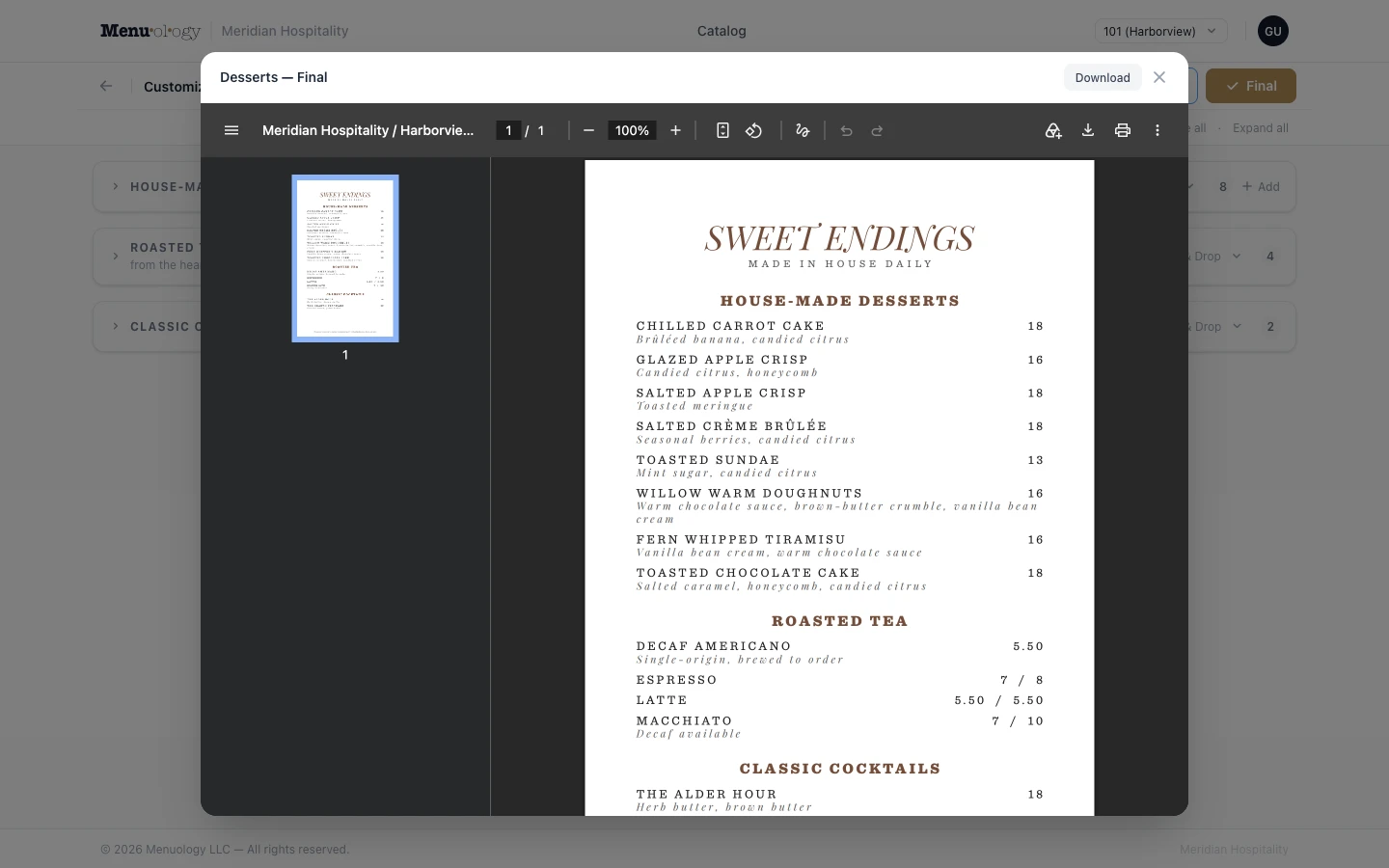
Your menus come out at true print specification: the typography, the spacing and the placement your designer intended, on a file a commercial printer will accept without a conversation. That covers the scheduled run.
It also covers the other kind. The salmon ran out at four o'clock, so you pull it, reprint, and the next guest is handed a menu that simply never listed it. No apology at the table, no line struck through in pen, no 'sorry, we're out of that.'
The file is an ordinary PDF and it belongs to you. Send the long run to your commercial printer, put the urgent reprint through the machine in the back office, or walk it into the print shop down the street. Different choices for different menus, or different locations, if that suits you better. Plenty of vendors will only sell you menus printed through them, at their price and on their schedule. We hand you the file and stay out of it. Your printer stays your printer.
Price control across every location
One item at one restaurant, or every price nationwide.
Change one item's price at one restaurant, or every price across the country, or anything between the two. Nothing forces you into a sweeping update when what you meant was a single number, and nothing makes you edit four hundred menus one at a time when you meant all of them.
Stage changes ahead of the date they take effect, then push them exactly as far as they should go: nationally, across a region or a state, to a group of locations you define, or to that one restaurant. If a push turns out to be wrong, roll it back. Price history and change reporting mean you can always answer what a price was, when it changed and who changed it, without anyone reconstructing it from memory.
Your structure, not ours
National, regional, state, market, group, single location, in any combination.
Items and prices are assigned wherever they actually belong: nationally, by region, by state, by market, by concept, by a group of locations you define yourself, or at one individual restaurant, and in any combination of those at once. A national price, with a different number across one state, and a different one again at the airport location, is an ordinary Tuesday rather than a special case that needs a workaround.
You set the exceptions. Everywhere else takes care of itself, so nobody is maintaining a separate menu for every store. This is the part that decides whether a system can hold a real chain at all. Menuology adapts to how your business is already organized. You do not reorganize your business to suit Menuology.
Corporate control, local flexibility
Locations change what you permit, and nothing else.
The structure above decides what reaches a location. This decides what a location may do about it. Where you want the latitude, individual restaurants maintain their own items (a local wine list, a regional special, a seasonal insert) inside limits corporate sets. Where you don't, they simply can't, and the option isn't there to be argued about. Anything a location does add still runs through the same pricing and print rules as everything else, so local autonomy never becomes a gap in the record.
Local beverage programs that stay on brand
Local wine, beer and cocktail lists, set in the corporate template.
Beverage is where a national brand meets a local market. The list that sells in Portland is not the list that sells in Miami, and it shouldn't be. But neither should a store's wine list look like it was typed up in the back office. Locations maintain their own wines, local taps and seasonal cocktails while corporate keeps the core pours, the section structure, the typography and the layout. The result reads as though corporate designed it, because corporate did. Everything a store adds still flows through the same pricing and print rules as the rest of the menu.
A record of what actually printed
Which menu, which locations, which version, when, and by whom.
Every publish is logged: which menu, which locations, which version, when, and by whom. When someone asks what the Denver store had on the table last Tuesday, the answer is in the system rather than in somebody's memory.
Also included
Everything else, and none of it an add-on.
Not upsells, not modules, not a higher tier. They ship with the product because a menu system without them is only most of a menu system.
Multilingual menus
Every language your guests read, checked before it prints.
Publish the same menu in the languages your guests actually read. Your team reviews and approves every translation rather than trusting a machine with your food descriptions, and you can see at a glance which languages are still incomplete, so a Spanish menu never ships with three untranslated desserts nobody noticed.
Reporting your operators will actually open
Print activity, item usage, change history, all exportable.
See which locations printed what and when, where an item is used across the menu set, which items have not shipped on a menu in a year, and what changed between two versions. Everything exports to Excel. And if you need a report nobody else does, it gets built into your system rather than turned down.
Training materials that stay current
Illustrated training material built around your operation, and kept current.
Rolling software out to a few hundred general managers is a training problem, not a software problem. We build illustrated field guides around your own system: real screenshots of your screens, covering the features your locations actually have, in separate editions for corporate administrators and store users. We keep them current as the software changes, so nobody is ever training from a manual that no longer matches the screen. Most vendors hand you a generic PDF and wish you luck.
Modern authentication
Passkeys, two-factor, role-scoped access.
Passkey sign-in and two-factor authentication, with roles that keep corporate administrators and store users apart. Accounts are created by your administrators: nobody signs themselves up to your system, and nobody is still using a shared password taped inside the office drawer.
The workflow
Draft, proof, publish, with a record of all of it.
Author centrally
Items, descriptions, prices and modifiers live in one library. A change is made once.
Right at every location
Each location gets its own menu: the corporate menu, plus market pricing, local items, or a section it doesn’t carry. Nobody assembles it by hand.
Proof on screen
Previews come back in seconds, so approvals never wait.
Publish final
Publish means the file is made and locked. Every published menu is kept exactly as it went out, so you can always retrieve precisely what a location printed, and when.
Connecting it up
Your website should not contradict your menu.
If you have a web team, they can pull your finalized menus straight from Menuology and put them on your site: the same menu you just sent to press, not a copy somebody remembered to update. Nobody retypes a price, and your website stops quietly disagreeing with the menu on the table.
See it work the way your team would.
A short demo on sample data, walked through in the order your team would use it: author, price, customize a location, publish, print. Bring your printed menu and we’ll talk through how it would be built.